When I was using Vista, I used to use Putty / X-Win to SSH to my Server.
But doing that on Ubuntu (or any Linux/Unix box for that matter) is very simple.
Go to Terminal Window.
Run ssh username@hostname/IP address
Enter your password when prompted.
You can exit from SSH using exit command.
That's it.
Isn't it simple?
Note: Though Linux version of Putty is available, using Terminal Window is much simple to use.
Sunday, March 1, 2009

Installing MySQL on Ubuntu
Go to Terminal Window and run sudo apt-get install mysql-server libapache2-mod-auth-mysql php5-mysql
You will be asked to enter your ROOT password. The screen looks like this
 When the installation is complete, run mysql -u root -p
Enter root password when prompted.
If no error message is displayed, MySQL installation is successful.
source: http://ubuntuexperiment.wordpress.com/2008/11/10/installing-apache-php-mysql/
You will be asked to enter your ROOT password. The screen looks like this
 When the installation is complete, run mysql -u root -p
Enter root password when prompted.
If no error message is displayed, MySQL installation is successful.
source: http://ubuntuexperiment.wordpress.com/2008/11/10/installing-apache-php-mysql/
Installing PHP5 on Ubuntu
Go to Terminal Window and run sudo apt-get install php5 libapache2-mod-php5
Now restart the Apache Server ( sudo /etc/init.d/apache2 restart )
To test if installation was successful or not, lets create one test file, run the following command. sudo gedit /var/www/test_file.php . This will open up gedit editor. Type . Save the file and close gedit.
Now open your favorite Web Browser and go to the URL http://localhost/test_file.php
You should see something like this.
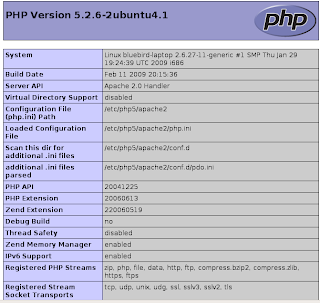
Source: http://ubuntuexperiment.wordpress.com/2008/11/10/installing-apache-php-mysql/
Now restart the Apache Server ( sudo /etc/init.d/apache2 restart )
To test if installation was successful or not, lets create one test file, run the following command. sudo gedit /var/www/test_file.php . This will open up gedit editor. Type . Save the file and close gedit.
Now open your favorite Web Browser and go to the URL http://localhost/test_file.php
You should see something like this.

Source: http://ubuntuexperiment.wordpress.com/2008/11/10/installing-apache-php-mysql/
Installing Apache WebServer on Ubuntu
Hi,
'm coming from Windows background.
I used to use WAMP / XAMPP on windows.
Now I 've switched to Ubuntu and 'm loving it.
I was trying to install Apache WebServer on my machine. I googled a bit and found the solution. I didn't knew installing Apache on Linux could be so easy.
'm coming from Windows background.
I used to use WAMP / XAMPP on windows.
Now I 've switched to Ubuntu and 'm loving it.
I was trying to install Apache WebServer on my machine. I googled a bit and found the solution. I didn't knew installing Apache on Linux could be so easy.
- Go to Terminal Window.
- Type sudo apt-get install apache2
- Enter the root password when prompted.
- When installed, open your Web Browser and go to URL http://localhost , If it has been properly installed, you should see It Work's!
- Now try restarting the server, sudo /etc/init.d/apache2 restart . If you receive any error like
apache2: Could not reliably determine the server's fully qualified domain name, using 127.0.1.1 for ServerName
... waiting .apache2: Could not reliably determine the server's fully qualified domain name, using 127.0.1.1 for ServerName - Run the command gksu gedit /etc/apache2/conf.d/fqdn . This will open up GEdit. Enter the following in it: ServerName localhost
- Now you should be able to restart your Apache. Try it out :)
Saturday, February 28, 2009
Removing file / folder forcefully
In Ubuntu (or any Linux based OS for that matter) have all folders starting with . (period) as hidden.
These folders will not be displayed with run ls command.
If you want to see the hidden files too, use ls -l command.
I was trying to delete one folder containing 2 files (I guess they are worms / virus in windows) Desktop.ini and Folder.htt . I tried deleting it using Delete Button on Keyboard. I also tried Shift+Delete (I know it doesn't matter) but it didn't work.
Finally after googling a little, I found the solution.
Forcefully delete them.
These folders will not be displayed with run ls command.
If you want to see the hidden files too, use ls -l command.
I was trying to delete one folder containing 2 files (I guess they are worms / virus in windows) Desktop.ini and Folder.htt . I tried deleting it using Delete Button on Keyboard. I also tried Shift+Delete (I know it doesn't matter) but it didn't work.
Finally after googling a little, I found the solution.
Forcefully delete them.
- Open terminal
- Go to the folder you wish to delete.
- Delete all the files in that folder using sudo rm * (enter your root password when prompted).
- Now go up one directory using cd .. command.
- Now run sudo rmdir foldername
Extracting RAR file on Ubuntu
I recently installed Ubuntu on my machine.
I had Vista earlier. I was fed up of Vista.
This is Ubuntu is awesome. Never gets freezed.
I got some ebooks, I needed urgently, from one of my friends. But it was in .RAR format.
I was wondering if there's any RAR extractor for Linux.
I used to use WinRAR on Windows.
I searched online and found the command to install it on my machine.
It's simple.
Open Terminal (On Ubuntu: Application -> Terminal)
Type: sudo apt-get install rar
and it's done.
How to use UNRAR?
Type: unrar help
You will see bunch of options that can be used with unrar.
To just extract the files on your current drive, use..
unrar e filename.rar
I had Vista earlier. I was fed up of Vista.
This is Ubuntu is awesome. Never gets freezed.
I got some ebooks, I needed urgently, from one of my friends. But it was in .RAR format.
I was wondering if there's any RAR extractor for Linux.
I used to use WinRAR on Windows.
I searched online and found the command to install it on my machine.
It's simple.
Open Terminal (On Ubuntu: Application -> Terminal)
Type: sudo apt-get install rar
and it's done.
How to use UNRAR?
Type: unrar help
You will see bunch of options that can be used with unrar.
To just extract the files on your current drive, use..
unrar e filename.rar
Subscribe to:
Posts (Atom)